visit counter for blogspot
blogberrygarden  
Thanks
4 reading
this blog
amazing finds blog reader opinion feedback comments post
Showing posts with label facebook. Show all posts

8/21/11

How to upload/post animated/moving gif picture to facebook. Ways to post images


What's up with the animated gif image being posted on facebook? Why is it not animated any more after you upload it?

There are some animated/ moving gif pictures/ images on facebook that you may see in people's albums. In the past it was possible to upload/ post animated pictures on facebook directly to the wall on into one of the albums just like you would upload any other image and it would remain animated in your album and also in the thumbnail in the stream/ news feed or on a person's wall.

moving gif animated black running cat green floor image picture

pic: animated cat moving gif image. black running cat, green floor picture.

This feature was changed a while ago as facebook implements various changes now and then and to many facebook user's seeing animated gif in different places on facebook and not being able to post your own is a mystery they can't solve, well, facebook now just converts all animated pictures to regular flattened ones and there you have it- your cute moving gif picture is flattened and isn't animated any more.

The gif pictures/photos on facebook that are still animated were uploaded to facebook some time ago when it was still possible to do so and they are left intact, in original condition and still work.

Does all this mean you can't post a moving picture/photo on your facebook?
Just recently there was another way, although not quite a direct way to have an animated gif in some places in your facebook. This was possible to do in your facebook notes and you had to apply a little code in the note space rather than just upload an image to facebook.

Although it seems like facebook removed this possibility to include a moving picture in the notes without disabling the 'move factor'  I'm including an instruction here on how to insert an external image in your facebook notes just because it may be useful in some cases to use an external image instead of uploading one directly to your facebook and if facebook makes changes to it's notes' html functionality again this may again start working.

The following also explains how to get the url image location so that it can be used in another method described here that is the closest to posting an animated gif image on facebook.

How to include an external image in the facebook note: Chose any free or any image host on the internet that allows to hotlink an uploaded image and upload your moving/ animated gif or any image to that host. Hotlinking an image means that you link to the image on the host from any other place on the web. You will link directly to the location of the image, not just to any page that displays that image and belongs to that host.

Let's say you upload your image to photobucket.com. Get the url of the image location and put it in this code.

<img src="http://myimagelocation.gif" />

Replace the phrase -- http://myimagelocation.gif -- in the code with the url address of your image.

On photobucket for instance you can get the url address of the image right from your photobucket page that displays that image by clicking 'share'.
Otherwise you can right click on the image and choose something like 'image location', the exact wording for that option in the right click menu would depend on the browser that you are using and you can get the url of the image this way.

In Internet Explore for example the right click menu would have the word 'properties', it's the last one of the options, and you can copy the url address of your image after you click on 'properties' first.

After constructing the above mentioned code using your own image location copy and paste the completed code into your facebook note in the place where you want your image to go.

Once you create a note with your external picture included in it, the note with the image thumbnail will show up in your facebook stream and the news feeds of your friends after you publish it and any time later if you repost that note's page on your wall or on your friends wall.

So what can we do now to somehow get an animated gif image/photo posted on facebook in some form?
The closest to this would be to use the url address of your desired image that you can get by following the instruction above and make a post with that url on your wall or your facebook homepage, this will show the thumbnail of the image and when you or someone else clicks on the image thumbnail it will bring up the page where the image is hosted and this page will show the original animated gif picture in it's fully functional animated form.


In this post: upload animated moving gif picture image photo to facebook post html code img url address location notes post

3/30/11

How To Share Someone's Status Facebook no Button Trick


How do you share someone else's status update on facebook?

There is no share button on the facebook status like the one you can see on other posts that contain a link, a picture or anything that makes it a post as opposed to a status update.

Not really big tricks but little ones that make this possible are here for you to choose from.

There is two ways to share a friend's status update and you can use these methods to share anyone's status update whether it's a person's page or a fan page.
Actually there is even a third way to do it, but it's a little different than a straight share method.

Whichever way you choose to use to share a friend's or a page's status - it's quite simple and not more difficult than if there was a share button.

Of course facebook sometimes adds and changes it's features so if there is a share button for the statuses somewhere in the plans then this methods will not be needed at some point but as of the moment of writing this post this little "tricks" can come very handy.

Method 1. Right click on the time stamp bellow the status you want to share and choose an option such as 'copy link address' or 'copy link location' or something similar depending on the browser that you are using. Different browser's right click menus have different words for the same functions.

If you are using Mac then you can do 'a double finger press and hold' instead of right click to bring up the menu.

Now go to your facebook wall or homepage and paste the link that you just copied just like you would paste any other link that you want to share with your friends.
This should bring up the person's profile picture and his/her status right into your post.

Method 2. Click on the time stamp bellow the status you want to share as you would normally click on any link you want to go to and it will take you to the page where that status is located and it will be the only post on that the page. The page will be a permanent page for that particular status.

Now copy the URL of that page go to your facebook wall or homepage and paste the URL that you just copied just like you would paste any other link that you want to share with your friends.
This should bring up the person's profile picture and his/her status right into your post.

Method 3. This is not exactly the same as sharing a link but it gives you similar results and may be used for the same purpose. You will in this case repost another person post, or a page's post, while giving that person or a page credit for their post or status.

Copy the text from someone's status update or another post that you want to share and paste it as you would paste any text you want to include in your message or status update by going to your wall or home page.

The important thing here is to add a tag for that person to your message by pressing '@' sign and typing the person's name right after. This should become an active tag and the person will receive a notification that he or she was tagged.

Sometimes the tag feature may not work for technical reasons and you may choose if you want to not post that message if it doesn't have an active tag or post it without the tag but the person's name will be in your message so if you think that it's OK then just go ahead and share your post.

The picture here shows where you need to click when you want to get a permalink to the person's status or message page.

facebook status update tricks tags picture sharing friends messages

Click on the time and date stamp to get permalink to share someone else's status on facebook


in this post: facebook status update tricks tags sharing friends messages

3/24/11

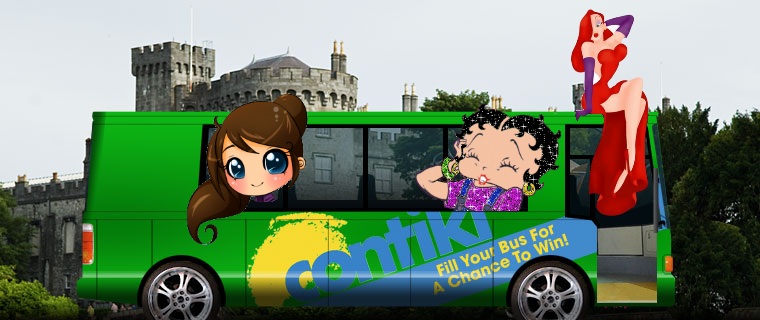
Contiki Facebook Get on the Bus contest Vote for Girls to Win a trip Budget holidays vacation travel

'Get on the bus' - Contiki on facebook contest.
The bus from Contiki Travel on facebook is going to Ireland.
If you vote, you'll help the girls win a trip to visit Ireland, the land of Guinness and Blarney Stone.
The lovely ladies are looking to go on an adventure and have a fun vacation!
Contiki helps people to travel around the world not spending a lot of money and have fun holidays and vacation times and meet new friends in the process.
Young people who haven't earned all that much yet can travel on a budget with  Contiki trips.

You too can choose a trip, gather a few friends and start your own bus or join one of other people buses and even try to get votes to win your trip.
Meanwhile you can help a few girls to hop on their bus going to Ireland by VOTING
on facebook.

UPDATE: This particular contest is over, but Contiki travel is still up and running.

contiki holidays vacation bus travel facebook girls cartoon trip ireland

Contiki travel bus with Cartoon girls team Betty Boop Jessica Rabbit Chibi girl

ireland trip contiki holidays vacation bus travel facebook

Contiki travel vacation. Ireland


in this post: Contiki trip holidays vacation vote for the girls to win on facebook the ladies bus trip fun adventure friends budget travel

3/6/11

International Women's Day March 8 100th anniversary Facebook event to Attend


March 8 is the International Women's Day.

International Women's Day March 8 Facebook event

WISHING HEALTH AND HAPPINESS TO EVERY WOMAN IN THE WORLD
on this day and always!!!
March 8 is The day of hugs, kisses, love notes, flowers and smiles!
Please distribute all of the above freely.

To join this event on facebook go here March 8 International Women's Day

March 8, 2011 is the 100th Anniversary of International Women's Day!

International Women's Day celebrates achievements of all women around the world.
It is a national holiday in 25 countries.

President of the United States Barack Obama has designated the month of March as Women's History Month.
Along with celebration of the political, economic, cultural and social achievement of women throughout the world, IWD also reminds all people of the continuing struggle for the equal rights that many women still encounter in today's world.
International Women's Day was established in 1910 in Copenhagen at the International Conference of Working Women by a famous German socialist Clara Zetkin.
In many countries where March 8 is celebrated as a national holiday, it became a tradition to give all women of any age at home, school or at work flowers and small gifts on this 8th day of Spring.


in this post: march 8 international woman's day celebrate love friendship women men people relationship romance facebook event celebration worldwide holiday world friends calendar 2011 open event please attend

3/3/11

Facebook cartoon profile pictures Weird popular character campaign

Facebook 'Change your profile picture to a cartoon character campaign' is so weird but it's kind of funny too. This facebook page has so many people that liked it (aka fans), it's quite amazing. Everyone who wants to change their profile picture into a cartoon character can easily do that. And lots of people like cartoons, children and adults alike. May be that is why there is so many people who like this campaign page. Everyone likes doing fun and easy stuff and this is just that. It's easy and fun and this has to be one of the reasons why it's so popular. This 'Change your profile picture to a cartoon character' facebook page has tens of thousands of fans but to be a fan of a facebook page you first have to like it it. Or at least you have to click the 'like button'. So as weird as it is it's fair to say that tens of thousands of people like this facebook page.

A little bit of history - a few facts.
When the page "Change your profile picture to a cartoon character campaign" was created, around December 1st 2010, it became widely popular in a matter of a very short time, about a few days or so and searches in Google for cartoon images were reaching an usually high number by Saturday, december 4th 2010.
There was a huge number of people who thought that the page was created by pedophiles to identify children using facebook and taking advantage of that easily accessible information to try to become 'friends' with those children on facebook, which afterwords could lead to tricking the children into thinking that their new facebook friends are 'nice friends' and it's safe to be in contact with them. That could become an opportunity for the fake 'nice friends' to get too close to those children and there would be a higher chance of the child abuse possibly taking place.

The way this could happen is that people were also asked to change their profile picture into a favorite cartoon of their childhood, doing so would quite obviously give away the approximate age of the person with their new profile cartoon picture corresponding to certain years.

But it turned out that the said facebook page campaign had absolutely nothing to do with pedophiles and child abuse in the sense that it was actually supporting a very good cause of preventing child abuse and giving much attention to the NSPCC (National Society for the Prevention of Cruelty to Children) web site raising awareness about Worldwide Violence Against Children and Child Abuse.

Some people were posting angry massages on the cartoon profile picture campaign page such as these ones:
-----
"THIS IS DOING NOTHING. IT’S NOT HOT, ADORABLE OR FUNNY. IT IS NOT
RAISING AWARENESS FOR ANYTHING EXCEPT YOUR IRRELEVANT OPINION ON WHO
YOUR FAVORITE CARTOON CHARACTER IS. I DON’T WANT TO SEE SOME BITCHASS
CARTOON CHARACTER AS YOUR PROFILE PICTURE"
-----
"This is for all of us who changed our picture to a cartoon one.Apparantly the group are a group of pedophiles.Their doing it because children will accept there friend request faster if they see a cartoon picture.It has nothing to do with supporting abused children.. Sorry People.. :/"
-----
"for all those who changed their facebook pics - why not make a real difference and donate to the NSPCC (or your national equivalent)"
-----

The responses to that were posted that were convincing and coming from relevant credible sources:
-----
"DO NOT BELIEVE ON THE FALSE RUMOR SPREADING THAT "The original group asking everyone to change their profile picture to a cartoon character is actually a group of Pedophiles." === THIS IS NOT TRUE!!!!! THOSE PEOPLE SPREADING THIS FALSE RUMOR ARE STUPID MIS-INFORMED INDIVIDUALS WHO ARE TRYING TO MISLEAD EVERYONE. THIS IS ONE WAY TO DISCOURAGE US TO SUPPORT THE CHILD ABUSE AWARENESS CAMPAIGN. SO DON'T LISTEN TO THEM... PLEASE CONTINUE SUPPORTING THE CAMPAIGN... IT'S FOR A GOOD CAUSE!!!"
-----
"Hysteria and rumors surrounding the facebook cartoon profile picture campaign abound. From the UK's _Daily Mail_: A Facebook spokesman [Simon Axten] said: 'We’re concerned with the suggestion that paedophiles could use this successful viral campaign to target young people. This is not the case. 'This campaign has been taken up by thousands of people, none of whom can be identified as young or old by the character they pick for their profile image. 'People on Facebook often change their profile picture and whether it is to an image of a cartoon character or a photo with friends, it does not make you less safe on Facebook. 'We were pleased to note that the National Society for the Prevention of Cruelty to Children, while not responsible for the campaign, have welcomed the attention it has brought to this important issue."
-----
Also a NSPCC facebook page had a post made by the NSPCC which is shown here:

NSPCC FB page traffic jump donations surge post supporting cartoon profile picture campaign

"Massive jump in traffic to our website and unprecedented surge in donations" - post made by NSPCC on their facebook page shows the "Change your profile picture to a cartoon character campaign" facebook page popularity benefited their website and child protection movement worldwide.

The National Child Abuse Prevention month is April.

You can change your own picture into a cartoon too. If you don't like any cartoons that are out there just change your own photo into a cartoon with the help of cartoon software and have a cartoon profile picture. Do it often and you may become popular too for having the most cartoon profile pictures on facebook.

Jessica rabbit cartoon girl funny boobs facebook character drawing
Jessica rabbit cartoon character. Adorable cartoon girl with cute cartoon boobs. Not real. But a very popular girl still.

cartoon girl face fun character drawing facebook funny
Cartoon girl face fun drawing. You can make this your profile picture too if you like it. Or draw your own cartoon face.

cartoon girl face funny monkey facebook character
Inger Nilsson as Pippi Longstocking in the 1969 TV series Pippi Longstocking. [Pippi Långstrump, a character from a children's book by Swedish author Astrid Lindgren, first published in 1945. Pippi claims her full name is Pippilotta Delicatessa Windowshade Mackrelmint Ephraim's Daughter Longstocking (Swedish: Pippilotta Viktualia Rullgardina Krusmynta Efraimsdotter Långstrump)].
Funny cartoonish girl with a monkey on her shoulder

cow boobs chicken grass cartoon funny drawing facebook character
Funny cartoon drawing. A cow with the boobs and a chicken. You can make it your profile picture too or you can also draw your own cow with a chicken or without and make it your profile picture if you like.

I don't know who this is but it looks like a cow, cow boobs and a small little chicken that wants to be as big as a cow. He needs a lot of exercise and a personal trainer to do this. But since they are all cartoons they may get (alone) along just fine, no need to work too hard.

If you like the idea you can 'like' the page here


Learn to draw a pretty girl cartoon or real beauty                                                Learn to draw Chibi
drawing pretty girl cartoon coloring picturelittle chibi anime cartoon character person school kid girl


in this post: facebook cartoon profile pictures character social networking gone weird facebook pages campaign strange odd different popular facebook user kids children adults competition cute drawing simple software awesome amazing adorable jassica rabbit nice boobs cow chicken girls fun funny drawings

3/2/11

A Day of Peace on Facebook Are you attending? Great Event


... for a day of peace. Wouldn't it be amazing?
Just one day in the year where we all held our tongues.
A day where we ignored others' shortcomings and made a valiant effort to be kind and understanding.
...A day where we all got along. It's sad that we are all at a point where we should do this, but it's even sadder to know that we easily could every day, but refuse to do so.
So on this day of peace...

peace day event facebook march 4 2011 2012 event drawing bird hand fingers leaves
facebook peace day event drawing. bird and hand.

Proposition:
On this day we all stick to three simple rules that will make the world a little bit more bearable. Feel free to partake in this before and long after then; the only reason I have the event set that far into the future is because I want word to spread and allow this to have as big of an impact as possible.
This event is to take place everywhere we go in the world, preferably all the time.

Rule #1.
Say not a single unkind thing about anyone or anything. If at all possible, try not to even think a nasty thought. If we do, reflect on why it was that we thought to say it in the first place.

Rule #2.
Show everyone we cross paths with some genuine human compassion. Be it with a smile or kind words, just spread some love.

Rule #3.
Make not one person the exception to the rule. Not everyone deserves to have roses thrown at their feet and have a holiday in their honor, but nobody deserves to feel alone. Reach out. Talk to someone new. Care about them, and we will be cared for in return.


To join A day of peace event go here


Facebook cartoon profile pictures strange popular campaign
helps to raise awareness about Worldwide Violence Against Children and Child Abuse.


cow boobs chicken grass cartoon funny drawing facebook character


in this post:event facebook peace good friends friendship love fun social networking march 4 2011 2012 day of peace great event drawing with bird hand fingers hearts leaves butterfly